
NIIMBOT’s B1 is the simpler, lower-priced label printer; the B1 Pro is listed with 300 dpi output and special-paper color printing. Before buying, check label sizes and refill compatibility, your device and app workflow, shipping estimates, and the brand’s return conditions.
Review highlights
- The B1 and B1 Pro are compact label-printer options with different workflow considerations
- Intended label size, phone or computer workflow, and ongoing label-supply cost affect the fit
- Confirm current device compatibility, supported labels, and app requirements before choosing
How we reviewed it: This is desk research based on public product listings and policies. We have not purchased or tested these products hands-on.
A compact label printer can make storage bins, product packaging, pantry containers, and inventory easier to identify. NIIMBOT sells several models, but the B1 and B1 Pro are a useful starting comparison because both are small Bluetooth thermal label makers while the Pro adds a higher published resolution and special-paper color features.
This is desk research, not a hands-on test. ReviewClearly has not purchased the printers, printed sample labels, or tested the app. Compatibility and performance details below come from NIIMBOT’s product pages and policies, so confirm the current model, app version, label stock, and shipping information before ordering.
Quick verdict
The B1 is the straightforward option for common monochrome labels. NIIMBOT lists it at $26.99 at the time checked, down from a stated $49.99 list price. It comes with one 50 × 30 mm roll, uses thermal printing without ink or toner, and the brand says it works with iOS and Android; a computer connection requires a USB cable and driver.
The B1 Pro is listed at $39.99, with a stated 300 dpi resolution and simultaneous black-and-red printing when used with special label paper. It also supports a wider label-width range according to the product page. That extra flexibility may matter for smaller text or product labels, but it adds a consumable compatibility question: special printing features require the correct paper, and the listing says the Pro is not compatible with iPad.
What the B1 does
NIIMBOT describes the B1 as a Bluetooth office label printer for home and small-business tasks. The page says the printer uses direct thermal printing, so it does not require ink or toner. The app listing mentions fonts, borders, symbols, and automatic label-size recognition. The B1 works with Android and iOS according to the product page, while printing from a computer requires a USB connection and a downloaded driver.
The product includes a 50 × 30 mm label roll, but that is only one format in a broader label ecosystem. Before buying, check whether NIIMBOT sells the size, color, adhesive, or material you need, and whether a given roll is listed for the B1 rather than another model. A low hardware price can be offset by the label stock you repeatedly use, so estimate consumable cost for your intended volume.
When the B1 Pro may be worth comparing
The B1 Pro’s listing states 300 dpi resolution and says it can print in black and red simultaneously when used with special paper. NIIMBOT also lists a built-in 1,500 mAh battery, Android and iOS compatibility, and USB-connected computer use through the company’s software. Its product page explicitly says it is incompatible with iPad. It describes a label width range of 8–350 mm; verify the exact compatible roll type before assuming every width works in every configuration.
The distinction is practical rather than abstract. If you only need basic black text on household bins, the B1’s published spec may be sufficient. If you frequently print smaller text, product photos, or a two-color emphasis, the Pro’s higher resolution and special-paper modes may be relevant. The brand’s page claims those abilities; ReviewClearly has not tested print clarity or the output on any label stock.
Popular picks from the brand, reviewed one by one
We prioritize products the brand labels as best sellers and add representative picks where they help compare its range. This is desk research, not hands-on testing; availability and product details can change. ReviewClearly may earn a commission if you shop through the links, at no extra cost to you.

B1 Multifunctional Office Label Printer
$26.99 listed Oct. 23, 2026
Thermal label maker listed with a 50 × 30 mm roll and iOS/Android support; check model-specific label compatibility.
B1 is the straightforward label-printer pick for shipping, storage, or small-business organization when its supported label sizes fit the job. The brand describes it as thermal and phone-compatible; confirm roll dimensions and app/device compatibility before buying, since the printer is only useful when the right labels are easy to source.
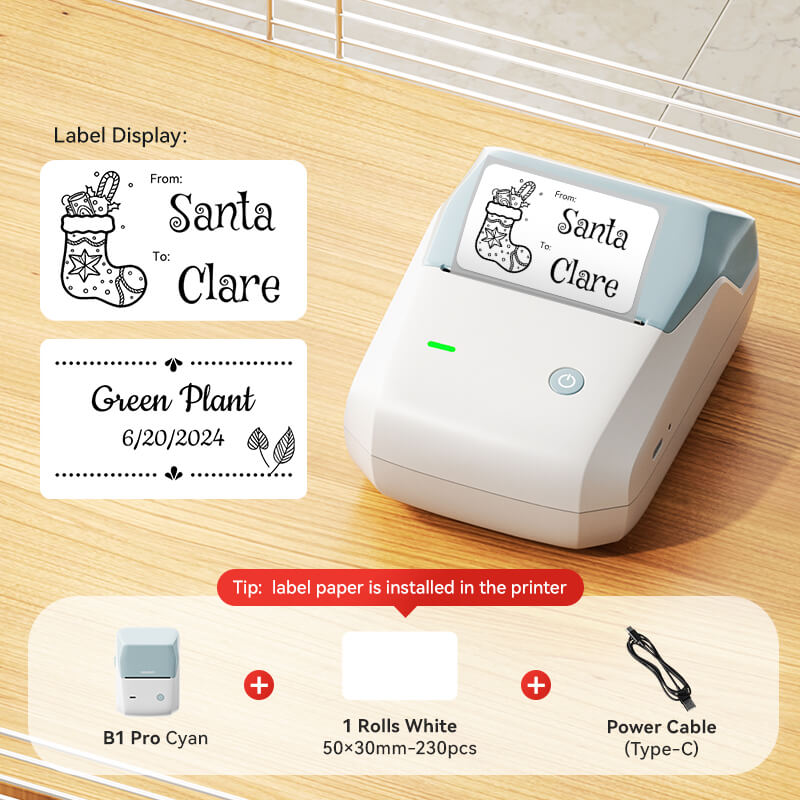
B1 Pro 300 dpi Label Maker
$39.99 listed Oct. 23, 2026
Brand lists 300 dpi output and says two-color printing requires special paper; product page says it is not compatible with iPad.
B1 Pro adds a higher published resolution and a black-and-red mode that requires special paper, according to NIIMBOT. Those features may suit smaller or more expressive labels, but they bring a model-specific media check; the listing also excludes iPad, so verify your device before ordering.
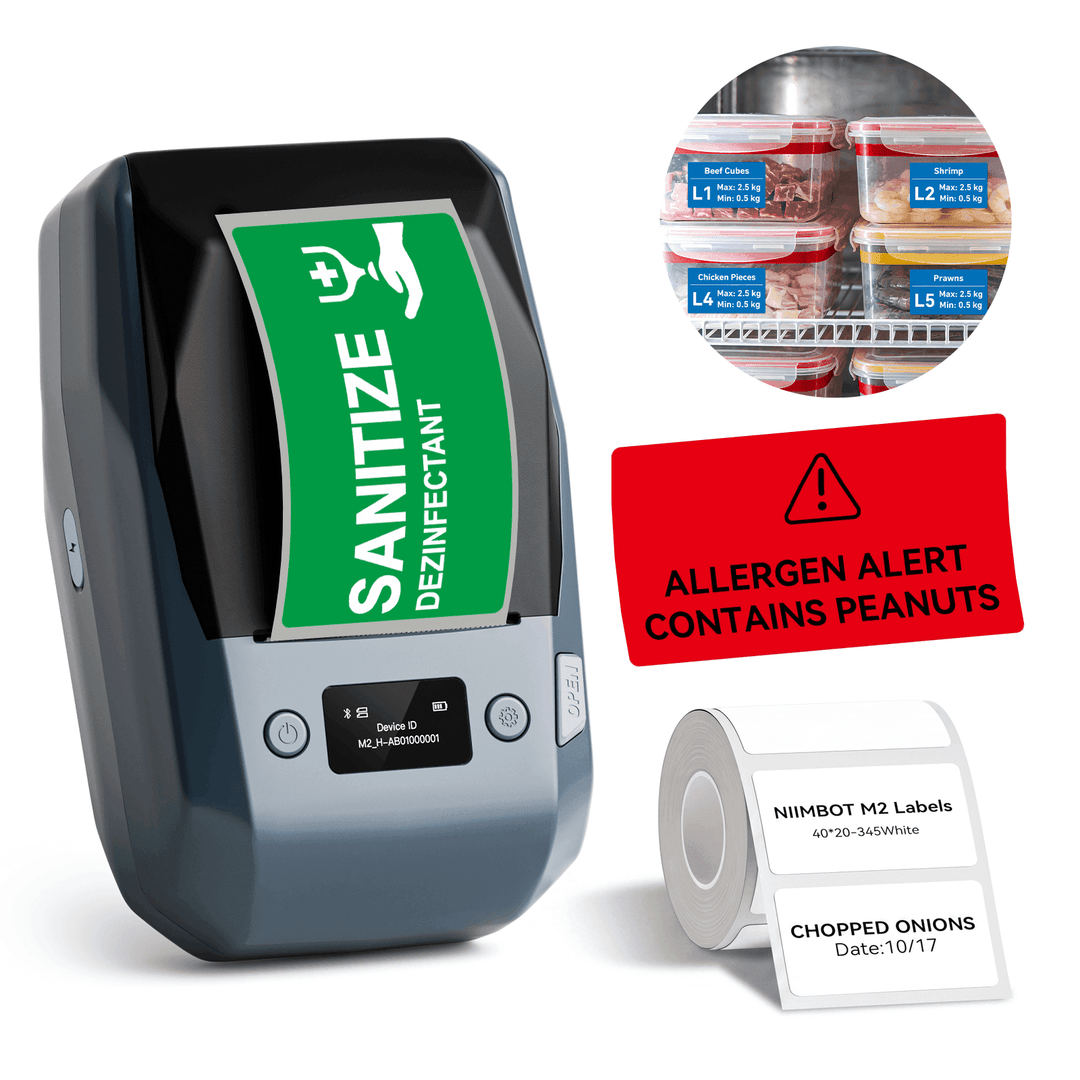
NIIMBOT M2 Thermal Transfer Label Maker
$99.99 listed Oct. 23, 2026
The brand lists 300 dpi thermal-transfer printing and phone/PC editing; compatible M2/M3 label rolls are model-specific.
M2 is the more specialized option for shoppers who need thermal-transfer labels or a broader choice of label formats than a basic household setup. That flexibility comes with a supply decision: compare compatible dimensions, ribbon needs, and device workflow, then estimate ongoing media costs before buying.
Price and availability snapshot
At the time of review, the B1 was listed at $26.99 and the B1 Pro at $39.99. NIIMBOT also displayed higher crossed-out list prices on those pages. Sale pricing is not a guarantee of future price, and shipping is calculated at checkout. The product page stated a 5–10 day delivery estimate to the U.S.; actual dispatch and transit can vary.
The two examples above are not the only models in NIIMBOT’s range. If you need larger shipping labels, specialty retail tags, photos, color, or batch printing, compare the whole model and label-paper compatibility before choosing. Do not assume two devices with similar names share every roll or app feature.
The workflow questions to answer first
Think about what you label and how often. A home user might label pantry jars, cables, storage containers, and files. A small seller may need consistent SKUs or packaging labels. A frequent shipper might need a different format or faster batch process. These use cases differ in label size, adhesive, print volume, and software needs.
Then check the device you plan to use. NIIMBOT’s B1 pages list mobile compatibility and a driver-assisted PC connection, while the B1 Pro page specifically excludes iPad. Verify your operating-system version, app availability, and whether templates can be saved or shared the way your work requires. The marketing description alone does not confirm every workflow or third-party software integration.
Returns and customer support
NIIMBOT’s public return policy states a 30-day window after receipt for returns, with the buyer responsible for return postage; unused items must be in original packaging for a change-of-mind return. Its policy also describes different remedies for defective or damaged products, including contacting support with evidence. Because the public site contains separate product and policy pages, read the current policy and contact support for the precise process before ordering if a return would be difficult from your location.
Who should compare these models
- Home organizers: the B1’s published features cover common monochrome labels and phone-based design.
- Small shops or makers: consider the Pro if its listed resolution or red-and-black option solves a specific label need.
- Buyers who print from a computer: verify the driver, cable, operating system, and app workflow for the chosen model.
- Anyone price-checking ongoing use: confirm the exact roll size and cost of repeat labels, not only the printer price.
Consider another format if you need large-volume shipping, specialized waterproof or freezer-safe labels, integration with a specific inventory platform, or a print process proven in a real production environment. We have not tested those scenarios.
What to check before checkout
- Pick the printer model based on the label size and print function you actually need.
- Confirm the paper roll is explicitly compatible with that model.
- Check device, app, OS, and computer-driver compatibility.
- Price replacement labels as part of the purchase, including specialty stock for color functions.
- Review shipping estimates and the 30-day return process, including customer-paid return postage.
Our assessment
NIIMBOT’s B1 and B1 Pro are easy to distinguish on paper: the B1 is a lower-cost monochrome thermal label maker, while the Pro adds higher listed resolution and a special-paper two-color option. The right choice depends on label stock and workflow rather than model tier alone. We would check compatible refill labels first, then verify the device and software fit before comparing the live checkout total.
Use the NIIMBOT partner link above to browse the current lineup. ReviewClearly may earn a commission if you buy through it, at no extra cost to you.
Sources and product details
- NIIMBOT B1 product listing (listed price, included roll, and published compatibility checked October 23, 2026)
- NIIMBOT B1 Pro product listing (listed price, resolution, paper requirement, and compatibility checked October 23, 2026)
- NIIMBOT shipping policy
- NIIMBOT return policy
- NIIMBOT best-selling products
Desk research of NIIMBOT’s current product pages, compatibility details, shipping page, and return policy checked October 23, 2026. ReviewClearly did not purchase or test the printers; performance claims are attributed to the manufacturer.